Application User Variables window
In the Kollmorgen Space Application User Variables  window, you can set the user variables aliases (symbolic name) and initialization values. The function of user variables is determined by the user in the application. You must set an alias for the variable to use it in a user application.
-
- Only 32-bit signed integer drive variables (User_Long_Vars) are fully supported by Kollmorgen Space at this point. Floating drive variables (User_Float_Vars) are not supported and should not be used.
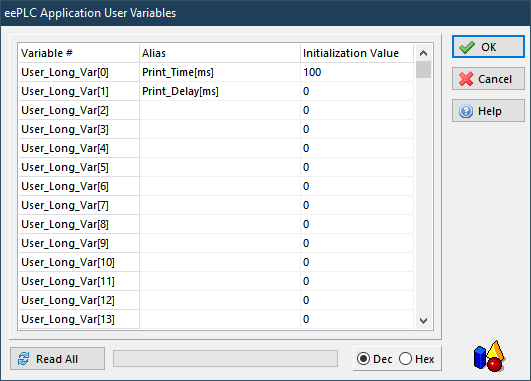
To use a variable in a user application, that variable must have an alias.
Clicking the Read All button allows you to read the current values from the drive.
The edited user variables values and aliases are stored together with the application instruction in the Kollmorgen Space application file (.edspc) once you click OK and Save .
The Initialization Value is the value that will be sent to the drive during the Application Download (see " Application Download window").
If you right-click inside the Variables Definition window, an Exchange Variables window will pop-up. This menu allows the user to exchange the alias and initialization value of two user variables.
If you right-click inside an Alias or Initialization Value text field, a pop-up menu will show different options for cutting, copying, pasting, and formatting text.


